Pick a copy before you put the DVD in
There's a purple bedroom, a four-color mat, and a girl on the television who can make a very ordinary hallway feel impossibly long. You can get all the way to that bedroom before you realize you've downloaded a different edition from your friend's. Decide what you came to do while you're still at the store.
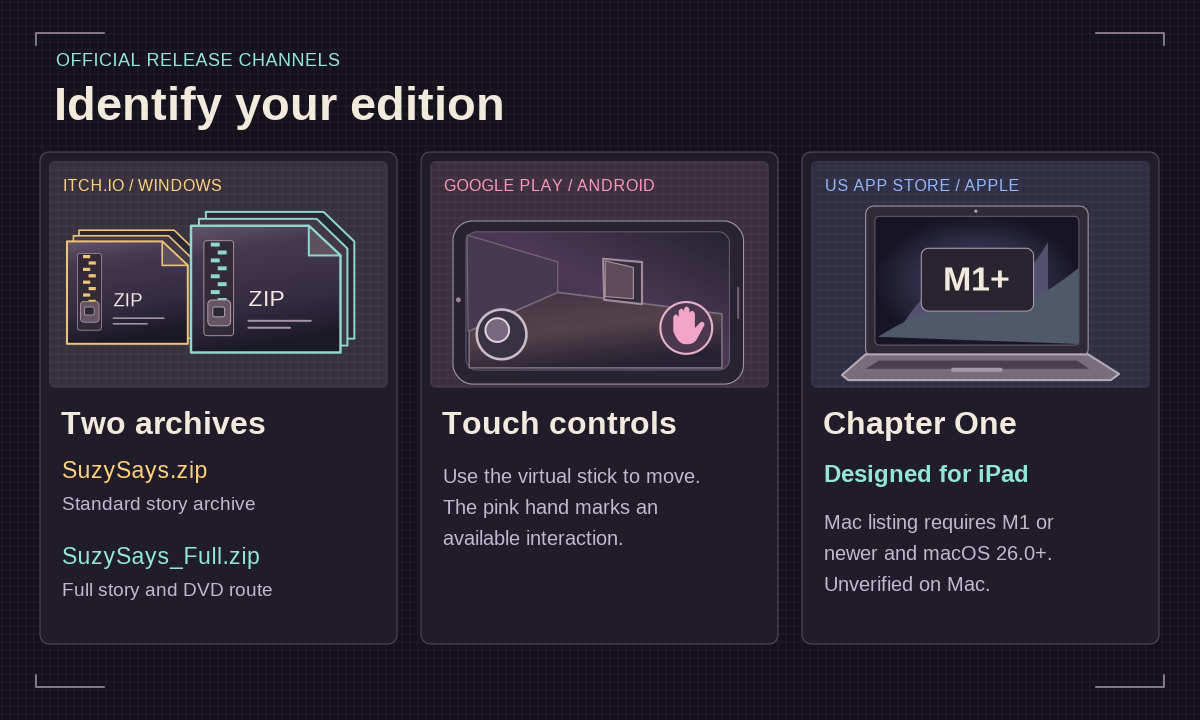
- Play the story on a Windows PC for free. Get the standard ZIP. You can follow Suzy's orders all the way to the four-candle ritual. If a friend tells you to sneak off and listen to the radio, check which archive they're running before you spend the evening trying to hear it.
- Reach both story endings. Pick Windows Full or the official Android app. You can give Suzy her candles or follow the other voice until you get a chance to break the disc. Full also has Endless mode if the part you love is trying to keep your feet still when she drops her name.
- Play on an Apple screen. Look for Chapter One. That title covers the iPhone, iPad, and the iPad app offered to eligible Macs. Apple's store page describes the opening night without listing which endings are included.
If a friend says they played “on PC,” ask what they opened. A ZIP from itch.io and an app in Google Play Games can run on the same Windows machine. The shop and filename will tell you which set of instructions to use.
| Device / edition | Requirement or status | Install or verify |
|---|---|---|
| Windows standardSuzySays.zip | 242 MB; pay what you want, including zerounknown Windows revision2026-11-07 | Store lists Windows and ships a ZIP. Extract and launch.Choose Full for the documented Windows radio route.Windows listing |
| Windows FullSuzySays_Full.zip | 242 MB; US$1.50 minimum at checkunknown Windows revision2026-11-24 | Endless mode and two endings per developer.Same file size as standard. Use the filename to tell them apart.Windows listing |
| Androidcom.moonbit.suzysays | Free, contains ads; listing metadata indicates Android 111.0.0.4 on US Play listing2026-11-23 | Developer links to Google Play. Check the device selected on the store.Official Android launch announcement November 18.Android announcement |
| Windows via Google Play Games on PCcom.moonbit.suzysays | Check Play Games compatibilityAndroid app on PC storefront2026-11-27 | Google lists the mobile app for its PC client.This channel uses the Android title. For Windows Full use itch.io.Play Games on PC |
| iPhone and iPad6834924704 | Free in US store; iOS or iPadOS 26.0+Apple 1.02026-11-26 | Look for Moonbit Ltd. and Chapter One.Ending parity with Windows Full unknown.US App Store |
| MacBook (Apple Silicon)6834924704 | M1 or later AND macOS 26.0+Designed for iPad; Apple 1.02026-11-26 | Apple allows the iPad app on qualifying Macs and marks the app unverified for macOS.Intel is outside the listed requirement. No verified native Mac ZIP or desktop controls.US App Store |
| SteamNo official listing identified | Not applicableUS store query2026-11-27 | The targeted US store check returned no matching title.No Steam release date was listed. The current Windows download is on itch.io.Steam search |
| BrowserNo official listing identified | Not applicableOfficial storefront snapshot2026-11-27 | The official itch page distributes a Windows download.A Play Now button on a fan site does not establish a browser release.Windows listing |
Windows · Standard and Full
Get the right Windows ZIP
Read the name all the way to the dot. Both Windows archives say 242 MB on itch.io. The one little word that changes your evening sits between an underscore and the file extension. Here's how to go from Moonbit's page to the mat with the copy you meant to start.
- Open Moonbit's page and select Download Now. The game uses itch.io's pay-what-you-want checkout. You'll see a free choice for the standard release and a minimum payment beside the Full file. You can decide at this point whether you want the extra ending and Endless mode. Moonbit's Windows downloads
- For a free first night in the house, choose
SuzySays.zip. Extract the entire archive in File Explorer with Extract All. Name the destination something recognizable, such as Suzy Standard, especially if you're planning to come back for the other ending. - For the radio route on Windows, choose
SuzySays_Full.zip. The US price shown for access to that file is $1.50 or more. Once you've paid, select the file with _Full in its name. Put this extract in its own folder so you can tell which program you're opening. - Open the extracted folder and start the game there. Leave the files together. By default you walk with WASD, jump with Space, crouch with C, and interact with a left click. If WASD feels awkward on your keyboard, the November 20 update lets you change the movement keys. Moonbit's key binding update
Already paid and still getting the candle ending?
Open the Full folder directly for your next run. It's easy to pay for Full, download it, and then double-click yesterday's desktop shortcut. In Windows you can right-click a shortcut and check its target in Properties. If it points into your standard folder, use the executable in the Full extract. You can make a new shortcut once you've found it.
Getting the candle ending in Full is perfectly normal. Full still lets you do exactly what the girl on the screen wants. The other ending asks you to take time away from her and visit the living-room radio during the game. You've got five broadcasts to catch. Knowing you launched the right ZIP lets you concentrate on the first voice instead of wondering whether another purchase would make it speak. Follow the two ending routes
Back to contentsGoogle Play · Android 1.0.0.4
Find Moonbit on Google Play
Follow the link Moonbit put in its Android launch post. It takes you straight to Suzy Says! by Moonbit. If you're looking in a browser, the address contains com.moonbit.suzysays. That's particularly handy on a small screen where several search results can fit the same smiling face and only half a title. The official app is free to install and carries Google Play's Contains ads label. Moonbit's Android announcement · Open the app on Google Play
Check the device under the Install button. On the web, Google may offer another phone attached to your account. Open the listing on the handset you're holding to see what Play offers there. The listing data for build 1.0.0.4 identifies Android 11 as the minimum. Play's compatibility result for your specific model matters even if its Android version clears that bar.
Translate the PC guide into thumb movements
Your thumb does the walking here. When a Windows guide says to left-click, move within reach and use the on-screen interaction control. Try it with the schoolbag first. Put it down in the bedroom, then use the same control to read Mom's note in the kitchen. By the time you hear the phone beside the living-room armchair, you'll know how to answer it.
You can play through the ritual and the secret radio route on Android. Use the same room landmarks as the Windows route. For the candle near the little television, head for the living room. The larger television with Suzy on it sits back in your bedroom. Each candle has to go home to its own open circle, no matter how easy it looks to grab another on the way.
Google also offers the app through Play Games on PC. That store page has the same package ID. If you're sitting at a computer with Play Games open, use Google's compatibility check for that computer. If you want the downloadable Windows archive and its keyboard instructions, head back to itch.io. Google's PC listing for the Android game
Back to contentsUS App Store · Chapter One 1.0
Get Chapter One on iPhone or iPad
Search for the whole title, Suzy Says! - Chapter One. You're looking for Moonbit Ltd. as the seller. Apple uses the number 6834924704 for this app, so you can match it even if a search preview cuts the title short. The US release arrived November 26, 2026. Version 1.0 is free and calls for iOS 26.0 or later on iPhone, or iPadOS 26.0 or later on iPad. Get Chapter One from Apple · Apple's US release details
If you're looking the game up for someone else, have them open that page on the device they'll use. The artwork will load in an ordinary web browser on an older phone, too. On the device itself, expand Compatibility and compare the requirement with the version under Settings, General, About. An iPad and an iPhone on the same account can be running quite different system versions.
Here's what you're getting for that download. You come home from a friend's house after school and find a DVD waiting for you. The little girl wants to play a variation on Simon Says. That's the premise Moonbit describes for Chapter One. If your aim is specifically to pull the disc out at the end and snap it, Windows Full and Android are the two choices with a known route. Apple hasn't spelled out which endings its first chapter includes.
For someone who wants to read Suzy's lines in another language, scroll past the short store summary to the game description. The section headed Languages can look discouraging if you see only English. Moonbit's description gives you the in-game subtitle choices. You'll find the platform comparison farther down this page.
Back to contentsDesigned for iPad · Apple Silicon
Check your Mac's chip and system first
Open the Apple menu and choose About This Mac. Leave that little window up while you look at Chapter One in the App Store. Two details decide whether you can put the iPad game on the bigger screen. You need an Apple M1 chip or later and macOS 26.0 or later. The word “MacBook” on its own won't settle either question. Apple's compatibility details
- M1 or later and macOS 26.0 or later. Open the listing on the Mac and look for the edition designed for iPad. This is Chapter One, with the same app ID as the iPad release. Apple marks it as unverified for macOS. The store lets you check availability for your own Mac before you try it.
- M-series chip with an older system. Your chip clears the hardware requirement. The installed system still has to meet Apple's stated minimum. Check the full macOS version in About This Mac if all you remember is the name of the last update you installed.
- Intel processor. That Mac falls outside Apple's chip requirement even if it runs a recent version of macOS. The two archives on Moonbit's itch.io page are Windows downloads. The second one adds game content. “Full” has nothing to do with Mac support. Platforms on Moonbit's download page
If you're picking a version because you want to play with a particular keyboard or mouse setup, keep the iPad origin in mind. Moonbit publishes default keyboard controls for the Windows game, while eligible Macs run the iPad build of Chapter One rather than a native desktop port. Test movement, crouching, and interaction during the opening schoolbag chore before Suzy starts timing you on the mat.
Back to contentsLooking in Steam, a browser, or Roblox?
For Moonbit's Windows game, go straight to itch.io. Searching the US Steam store on November 27, 2026 turned up no matching title. There's no Steam release date to plan around in that search. If a friend's already playing on a gaming laptop, they can get the original Windows build from Moonbit or the Android game through Google's PC client. Check the Steam store · Download from Moonbit
On itch.io, Download Now takes you to files you save to your computer. You don't need to hunt around the page for a way to start the DVD inside your browser. Moonbit lists a downloadable Windows game there. A page with a similar name and a big Play button can send you into a different game altogether.
One especially convincing mix-up comes with a bed. If your directions end with climbing in and getting a Sweet Dreams card, check whether you launched Roblox. That bedtime ending belongs to a community adaptation. In Moonbit's house, Suzy can send you to the bed during an ordinary round. Listen for her name, do the jump if she gives you the proper cue, and get ready for the next command.
Back to contentsPick subtitles you can follow on the mat
Choose a language you can read in time to catch the first two words. “Jump on blue!” has the same color and the same exclamation point as a perfectly good instruction. You'll want to know whether Suzy put her name in front of it before you jump. On Windows you have thirteen subtitle choices, including Brazilian Portuguese, Turkish, Korean, and Arabic. An older download might offer fewer choices. Moonbit's current Windows language list
If a line near the end of a Windows run doesn't match what you're hearing, check when you got the ZIP. On November 8, Moonbit fixed a wrong late-game subtitle. The November 13 update added more languages, and the November 20 update brought Turkish, Arabic, Korean, and movement bindings. To use the updated text, download the edition you own again and extract it into a fresh folder. Start from that folder so you actually get the updated copy. Moonbit's subtitle correction
On Android, open What's new if your language appears to be missing from the description. The longer description names ten languages. The update notes add Arabic, Turkish, and Korean. On iPhone and iPad, expand the description of Chapter One for the ten languages offered in version 1.0. The separate Languages field says English. For a friend who needs Korean subtitles tonight, Windows or the updated Android version is a documented choice. Google Play update notes · Chapter One subtitle list
| Language | Windows | Android | Apple |
|---|---|---|---|
| English | Listed | Store description | Store description |
| French | Listed | Store description | Store description |
| German | Listed | Store description | Store description |
| Italian | Listed | Store description | Store description |
| Spanish | Listed | Store description | Store description |
| Brazilian Portuguese | Listed | Store description | Store description |
| Polish | Listed | Store description | Store description |
| Russian | Listed | Store description | Store description |
| Chinese | Listed | Store description | Store description |
| Japanese | Listed | Store description | Store description |
| Turkish | Listed | Update notes | Unlisted in 1.0 |
| Arabic | Listed | Update notes | Unlisted in 1.0 |
| Korean | Listed | Update notes | Unlisted in 1.0 |
When did that option arrive?
A tip from the first weekend of release can still get you through the house and steer you wrong about the download. The Windows game arrived first. The Android release followed on November 18, and Chapter One reached the US App Store eight days after that. Read the row for your device if you want to know why somebody playing a few days earlier saw a different menu.
| Date / platform | Change | What it means for your copy |
|---|---|---|
| 2026-11-07Windows | itch.io published | Original store publication; Windows ZIP branch.Windows listing |
| 2026-11-08Windows | LAUNCH (And Patch) | Late-game subtitle correction; re-extract the updated archive when comparing older footage.Patch note |
| 2026-11-13Windows | Additional Languages Added! | First language expansion. For current languages consult the later store list.Language update |
| 2026-11-18Android | Android version available! | Developer linked the official Android release. Earlier PC-only answers went stale.Android announcement |
| 2026-11-20Windows | Key binds + Turkish, Arabic and Korean Added! | Movement keys became customizable; added Turkish, Arabic and Korean subtitles.Bindings update |
| 2026-11-23Android | US Google Play listing check | The update notes for 1.0.0.4 add Arabic, Turkish and Korean to the ten subtitles in the description.Google Play |
| 2026-11-24Windows | itch.io download check | The store listed two ZIPs at 242 MB each. Use the filenames to tell the editions apart.Windows listing |
| 2026-11-26Apple | US store release | Version 1.0, Chapter One; check the Apple-specific ten-subtitle description.US App Store |
Footsteps on a black screen after Start
Stop walking and check when the picture disappeared. If you pressed Start, read the opening text, then heard footsteps against a completely black screen, you've hit a symptom other Windows players have reported. You're supposed to be able to see where you're taking the schoolbag. The game's intentional blackout comes much later, after you've played on the mat and answered Mom's phone call. There's no reason to feel around for a kitchen table during the opening.
On Windows, quit and go back to the folder where you extracted the game. Check the original ZIP name, open the executable from that folder, and note whether the title screen and opening text still appear. Listen for a footstep when you press a movement key. If the picture disappears at the same point a second time, you've got a specific sequence to report. Players have seen the issue persist after fresh downloads. A working fix for everyone has yet to surface. The Windows black-screen thread
On Android, pay attention to whether the screen goes fully black or freezes on the last room you could see. One player told Moonbit the image froze while the sound carried on. Their picture came back after leaving and returning to the app, then froze again. If that happens on your phone, include the model, Android version, app version, and what was on screen when it stopped. Those details give Moonbit a way to tell a recurring freeze from a problem that happens only at startup. Android launch discussion
Got a picture again? Take the schoolbag into your bedroom first. You have time to get your bearings before Suzy starts handing out stars and pink Xs. If the lights went out after Mom called, follow the switch prompts and return to Suzy. Head for the kitchen table when she actually tells you to hide. Find your step in the walkthrough
US store details checked November 27, 2026.
Back to contentsCommon questions
Where's the Steam page my friend used on PC?
Try asking them for their download link. Moonbit sells the Windows game on itch.io, including the Full ZIP. Google also offers the Android app through Play Games on PC. The US Steam search returned no Moonbit listing on November 27, 2026.
Will Chapter One run on my MacBook Air or Pro?
Open About This Mac and check the chip and system version. An M1 or newer chip paired with macOS 26.0 or later meets Apple's listed Mac requirements. Intel models fall outside them. On a qualifying machine, look in the Mac App Store for the app designed for iPad.
Can I finish the free Windows story before buying Full?
Yes. The standard SuzySays.zip lets you carry the four candles back to the mat for the ritual. For the other story ending, get SuzySays_Full.zip and follow the living-room radio. Both archives read 242 MB on the download page. Pick the one with the name you need.
Should I hide if the screen goes black right after the intro?
The hiding scene comes after the phone call. If you can hear footsteps as soon as the opening text clears and you've never seen the house, note that timing. Include your Windows ZIP or Android build and device details when reporting the display issue to Moonbit.
Do I have to use WASD for every Windows round?
You can change the movement bindings in the November 20 Windows update. If your old copy only lets you use WASD, get your edition again from Moonbit and launch the freshly extracted game. Try your chosen movement keys while you're still getting the bedroom ready.
Can my iPhone follow the Android secret-ending guide?
Apple's version is called Chapter One. Its listing introduces the DVD and the mat game, with ten subtitle languages for version 1.0. It doesn't specify a radio ending. Choose Android or Windows Full if hearing the five broadcasts and breaking the disc is the reason you're downloading.